
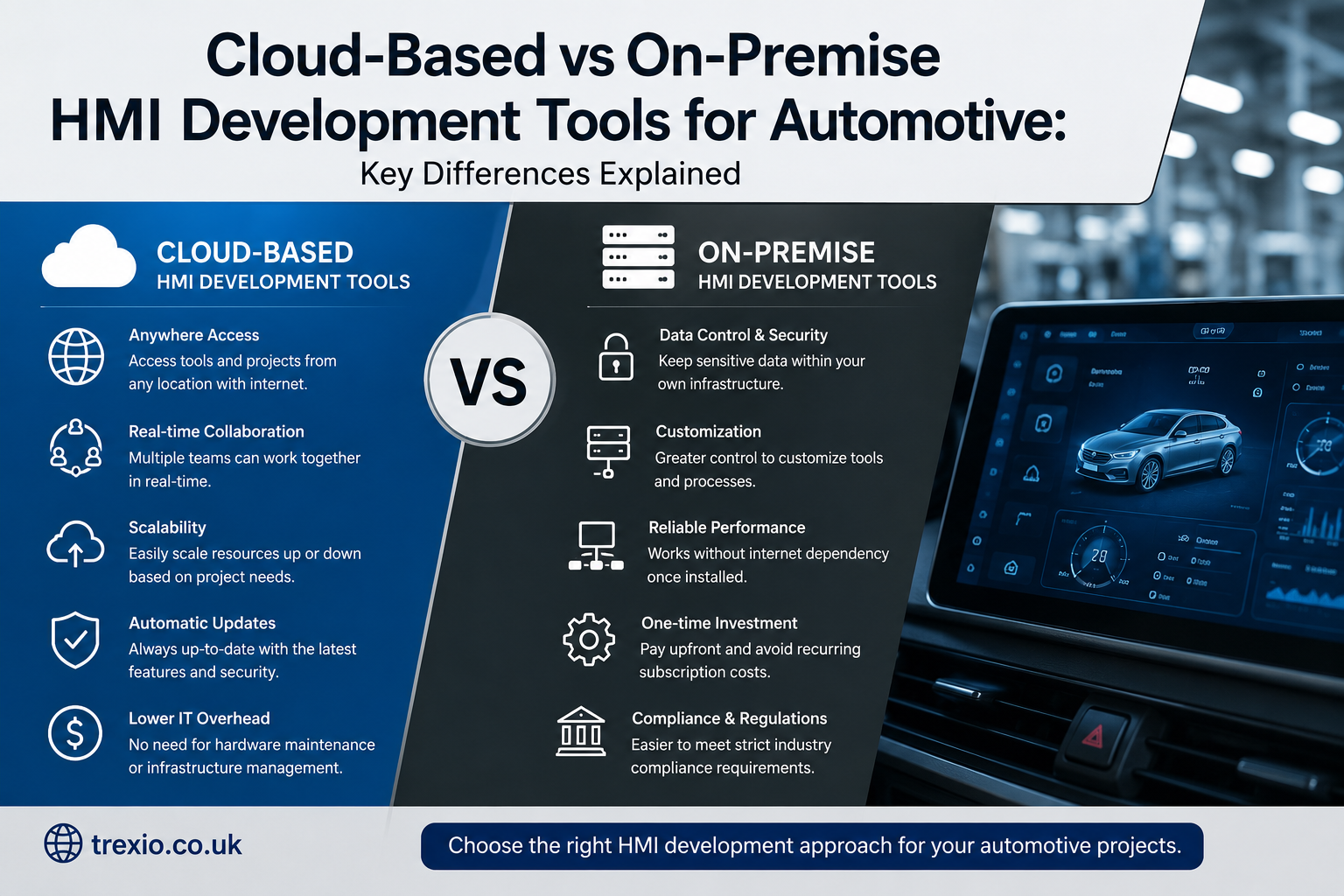
Modern vehicle development depends heavily on advanced Human Machine Interface (HMI) systems that create seamless interactions between drivers, passengers, and connected technologies. As software-defined vehicles become the industry standard, organizations are increasingly evaluating cloud-based vs on-premise HMI development tools for automotive projects to determine which approach best supports innovation, collaboration, and long-term scalability. Selecting the right development environment affects engineering productivity, cybersecurity, compliance, deployment speed, and overall development costs. Automotive manufacturers, Tier 1 suppliers, and embedded software teams all face unique requirements that influence this decision. Some organizations prioritize data sovereignty and complete infrastructure control, while others seek cloud flexibility and faster software delivery. Understanding both deployment models is essential before investing in an HMI development platform. This guide explores the major differences, advantages, and considerations to help development teams make informed decisions.
Quick Answer
When comparing cloud-based vs on-premise HMI development tools for automotive, cloud-based platforms offer greater scalability, remote collaboration, continuous integration, and faster software deployment. On-premise HMI development tools provide stronger infrastructure control, enhanced customization, predictable long-term ownership, and easier compliance for organizations with strict security or regulatory requirements. The best option depends on company size, cybersecurity policies, software complexity, budget, engineering workflows, and future digital transformation goals.
Understanding HMI Development Tools in the Automotive Industry
Human Machine Interface development tools allow engineers to design, test, simulate, and deploy graphical interfaces used throughout modern vehicles. These interfaces include digital instrument clusters, infotainment displays, center consoles, climate controls, navigation systems, augmented reality dashboards, and driver assistance displays. As vehicles become increasingly connected, HMI software has evolved into one of the most complex software components inside modern automobiles. Development tools now integrate with embedded operating systems, AUTOSAR architectures, Linux platforms, Android Automotive, and real-time operating systems. Automotive manufacturers rely on these tools to create intuitive user experiences while maintaining functional safety and performance standards. Whether selecting cloud-based vs on-premise HMI development tools for automotive, organizations must consider software compatibility, hardware integration, and lifecycle management. Modern HMI platforms also include simulation capabilities that reduce prototype costs and accelerate validation before hardware becomes available.
Automotive HMI development no longer focuses solely on attractive graphics. Today’s software environments include collaborative design systems, automated testing, AI-assisted interface optimization, code generation, version control integration, performance analytics, and cybersecurity validation. These features help reduce development cycles while improving software quality across multiple vehicle platforms. Because vehicles remain in production for many years, development environments must also support long-term maintenance and software updates. This is one reason why the debate around cloud-based vs on-premise HMI development tools for automotive continues to grow. Each deployment model provides unique strengths depending on organizational priorities, engineering maturity, and digital transformation strategies.
What Are Cloud-Based HMI Development Tools?
Cloud-based HMI development tools operate through internet-connected infrastructure rather than relying exclusively on locally managed servers. Engineers access development environments using secure authentication while project files remain synchronized across distributed teams. These platforms enable real-time collaboration among designers, embedded software engineers, UX specialists, testers, and project managers regardless of geographic location. Automotive companies increasingly adopt cloud technologies because modern vehicle development involves suppliers and engineering partners working across multiple countries. Cloud platforms simplify version management, automated builds, software integration, and collaborative interface design without requiring every developer to maintain identical hardware environments. As organizations evaluate cloud-based vs on-premise HMI development tools for automotive, cloud solutions often appeal to companies pursuing agile development methodologies and continuous software delivery.
Cloud platforms frequently integrate with DevOps pipelines, CI/CD workflows, AI-assisted testing, digital twins, cloud simulation, automated validation, and over-the-air update infrastructures. Instead of maintaining expensive local servers, organizations pay subscription fees that scale according to usage. Infrastructure management becomes the responsibility of the cloud provider, allowing engineering teams to focus on software development rather than IT maintenance. Updates, security patches, backups, and performance improvements are generally handled automatically. This flexibility makes cloud-based HMI environments particularly attractive for organizations building connected vehicles, electric vehicles, and autonomous driving technologies where software changes occur rapidly.
Key Characteristics of Cloud-Based Platforms
Cloud HMI platforms generally include centralized project repositories, collaborative editing, automated backups, elastic computing resources, integrated testing environments, cloud simulation, AI-assisted design features, and secure remote access. Developers can provision new environments within minutes rather than waiting for local infrastructure installation. Project managers gain better visibility into development progress while engineering teams collaborate without geographical limitations. These characteristics contribute significantly to faster software releases and improved development efficiency. Organizations comparing cloud-based vs on-premise HMI development tools for automotive often recognize collaboration as one of the strongest advantages of cloud deployment.
What Are On-Premise HMI Development Tools?
On-premise HMI development tools operate within an organization’s own infrastructure using locally managed servers, storage systems, networking equipment, and development workstations. Engineering teams maintain complete control over software installations, security policies, hardware configurations, access permissions, and data storage. This deployment model has traditionally dominated automotive software development because many manufacturers maintain highly secure engineering environments. Sensitive design files, intellectual property, and proprietary software remain inside controlled corporate networks rather than external cloud environments. For organizations handling confidential vehicle technologies, evaluating cloud-based vs on-premise HMI development tools for automotive often begins with strict data governance requirements.
Although on-premise systems require higher initial investments, they provide organizations with extensive customization opportunities. Companies can optimize hardware resources for demanding graphical simulations, embedded software compilation, and performance testing without depending on internet connectivity. Internal IT teams manage software updates, infrastructure maintenance, disaster recovery planning, and cybersecurity controls according to organizational policies. This approach may increase operational complexity but offers greater flexibility for companies with specialized engineering workflows. Automotive organizations with long product development cycles often appreciate the stability and predictability associated with locally managed HMI development environments.
Common Features of On-Premise Solutions
Typical on-premise HMI development environments include dedicated build servers, private source code repositories, hardware simulation laboratories, isolated testing environments, enterprise authentication systems, proprietary software integrations, custom automation pipelines, and highly controlled network access. These environments are often tailored to support compliance with industry-specific engineering standards while protecting confidential intellectual property. Companies evaluating cloud-based vs on-premise HMI development tools for automotive frequently value the extensive configuration flexibility offered by local deployments.
Cloud-Based vs On-Premise HMI Development Tools for Automotive: Core Differences
Choosing between cloud-based vs on-premise HMI development tools for automotive requires understanding how each deployment model affects engineering operations. Cloud environments prioritize accessibility, rapid scaling, collaborative development, and managed infrastructure. On-premise solutions focus on infrastructure ownership, security customization, local performance optimization, and complete administrative control. While both deployment models support modern automotive software development, their strengths align with different organizational priorities. Companies developing connected mobility solutions often favor cloud platforms because of rapid deployment capabilities and global engineering collaboration. Organizations managing highly confidential projects may continue investing in on-premise environments to maintain maximum oversight.
Neither deployment model is universally superior. Instead, successful implementation depends on aligning technology decisions with business strategy, regulatory obligations, engineering maturity, cybersecurity frameworks, software complexity, supplier collaboration, and long-term digital transformation goals. Many automotive manufacturers are now adopting hybrid approaches that combine cloud flexibility with locally controlled development resources. This blended strategy allows organizations to leverage the strengths of both deployment models while minimizing operational risks associated with relying exclusively on one environment.
Comparison Table
| Feature | Cloud-Based HMI Tools | On-Premise HMI Tools |
|---|---|---|
| Infrastructure | Hosted remotely | Managed internally |
| Initial Investment | Lower | Higher |
| Scalability | Excellent | Limited by hardware |
| Remote Collaboration | Outstanding | Moderate |
| Maintenance | Provider managed | Internal IT managed |
| Software Updates | Automatic | Manual |
| Customization | Moderate | Extensive |
| Internet Dependency | High | Low |
| Data Control | Shared responsibility | Complete organizational control |
| Deployment Speed | Fast | Slower |
Security Considerations in Automotive HMI Development
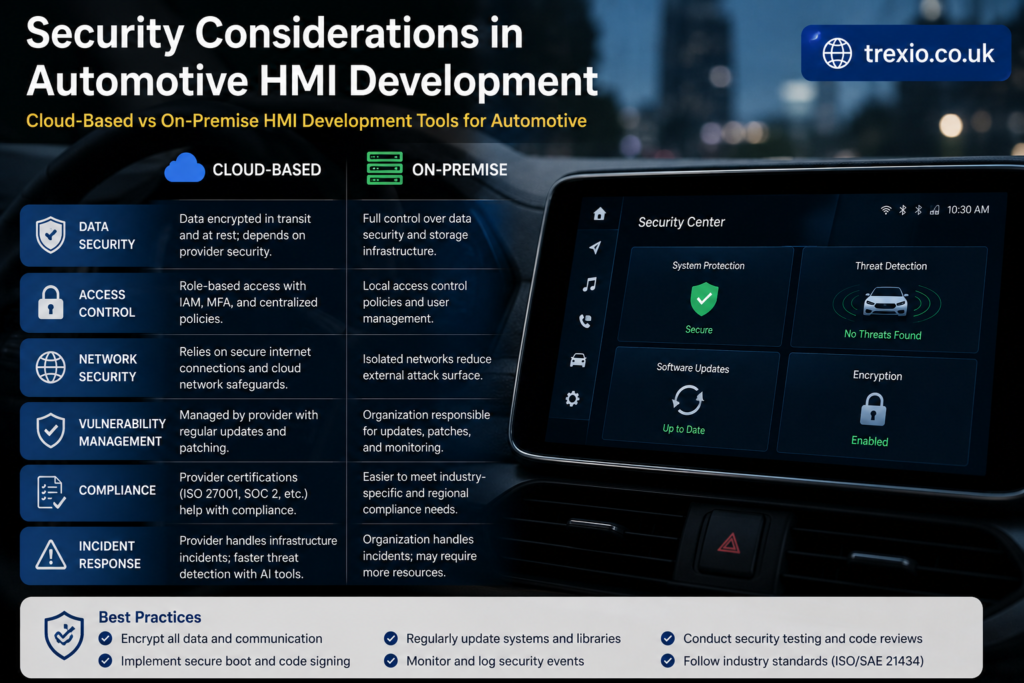
Security remains one of the most influential factors when evaluating cloud-based vs on-premise HMI development tools for automotive. Modern vehicles contain millions of lines of code, making cybersecurity a critical engineering priority throughout the software development lifecycle. HMI systems frequently interact with infotainment platforms, vehicle networks, driver assistance systems, telematics, mobile applications, and cloud services. Any security vulnerability introduced during development could potentially affect vehicle safety, customer privacy, or regulatory compliance. Consequently, automotive organizations implement comprehensive cybersecurity practices regardless of deployment model. Secure authentication, encrypted communications, access management, software signing, vulnerability scanning, and continuous monitoring all contribute to stronger software protection.
Cloud providers invest heavily in enterprise-grade security technologies, including encryption, identity management, infrastructure monitoring, automated threat detection, and distributed backup systems. Meanwhile, on-premise environments allow organizations to implement highly customized security architectures tailored to internal governance policies. Both approaches can achieve high security standards when properly managed. However, organizations should evaluate operational expertise, compliance requirements, vendor security certifications, disaster recovery capabilities, incident response procedures, and long-term maintenance strategies before making infrastructure decisions. Effective cybersecurity ultimately depends more on governance and operational discipline than on deployment model alone.
Compliance Requirements
Industry Standards That Influence Deployment Decisions
Automotive software development frequently requires compliance with standards governing functional safety, cybersecurity, software quality, and engineering processes. Development environments should support documentation, traceability, audit readiness, secure software development practices, change management, and controlled access to engineering assets. Whether selecting cloud-based vs on-premise HMI development tools for automotive, organizations should ensure their chosen platform aligns with both internal governance policies and applicable automotive industry regulations.
Cost Comparison Between Cloud-Based and On-Premise HMI Development Tools
When evaluating cloud-based vs on-premise HMI development tools for automotive, cost extends far beyond the initial purchase price. Cloud-based platforms generally operate on subscription-based pricing, allowing organizations to pay monthly or annually according to the number of users, computing resources, storage, and premium features required. This model significantly lowers the upfront capital investment and makes budgeting easier for startups and mid-sized automotive suppliers. However, subscription fees can increase as development teams expand or projects become more complex. On-premise solutions typically require substantial initial spending on servers, networking equipment, software licenses, backup infrastructure, and IT personnel. Although these costs may seem higher at first, organizations with long-term development programs sometimes find that owning their infrastructure provides a better return on investment over several years. Businesses comparing cloud-based vs on-premise HMI development tools for automotive should calculate the total cost of ownership (TCO), including maintenance, upgrades, electricity, security, and operational expenses rather than focusing only on acquisition costs.
Another financial consideration is scalability. Cloud environments allow organizations to increase or decrease computing resources almost instantly, preventing unnecessary spending on underutilized hardware. In contrast, on-premise infrastructure often requires purchasing hardware based on future growth projections, which may lead to idle resources during slower development cycles. Maintenance expenses also differ considerably because cloud providers typically handle software updates, hardware replacements, and infrastructure monitoring. Organizations managing on-premise environments must budget for dedicated IT teams, server maintenance contracts, hardware refresh cycles, and disaster recovery planning. Hidden expenses such as downtime, productivity losses, and delayed software releases should also be considered when comparing cloud-based vs on-premise HMI development tools for automotive. A comprehensive financial analysis helps decision-makers select a deployment model that aligns with both technical objectives and long-term business strategy.
Cost Comparison Table
| Cost Factor | Cloud-Based HMI Tools | On-Premise HMI Tools |
|---|---|---|
| Initial Investment | Low | High |
| Monthly Operating Cost | Moderate | Lower after setup |
| Hardware Purchases | Minimal | Significant |
| Maintenance | Included by provider | Internal responsibility |
| IT Staffing | Reduced | Higher requirement |
| Infrastructure Upgrades | Automatic | Organization-funded |
| Scalability Cost | Pay as needed | Purchase additional hardware |
| Long-Term Ownership | Subscription-based | Asset ownership |
| Budget Predictability | High | Moderate |
| Best Fit | Growing organizations | Large enterprises with stable infrastructure |
Performance and Scalability Considerations
Performance remains one of the most important evaluation criteria when comparing cloud-based vs on-premise HMI development tools for automotive. Automotive HMI applications often involve complex graphical rendering, real-time simulations, touchscreen responsiveness, animation processing, embedded software integration, and hardware validation. Cloud platforms have made significant progress by offering high-performance virtual workstations, GPU-enabled computing instances, and elastic processing power that can be allocated on demand. These capabilities allow development teams to execute large simulations without investing in expensive physical hardware. Since computing resources can scale dynamically, organizations experience greater flexibility during intensive development phases. However, internet connectivity and network latency may influence performance for teams working with large graphical assets or real-time collaboration sessions. Careful infrastructure planning ensures that cloud environments consistently meet demanding automotive engineering workloads.
On-premise systems continue to deliver exceptional performance for organizations requiring predictable local processing power. Dedicated hardware enables engineers to optimize systems specifically for embedded software compilation, interface rendering, simulation environments, and hardware-in-the-loop testing. Because data processing occurs within local infrastructure, latency remains minimal and network dependency is significantly reduced. Organizations with specialized engineering workflows often appreciate this consistency, particularly when working on safety-critical vehicle systems. Nevertheless, scaling an on-premise environment usually requires purchasing additional hardware, installing new servers, and expanding data center capacity, which can increase deployment time and capital expenses. Comparing cloud-based vs on-premise HMI development tools for automotive from a scalability perspective highlights the cloud’s flexibility while emphasizing the stable performance of dedicated local infrastructure.
Collaboration and Remote Engineering Workflows
Global automotive development has transformed software engineering into a highly collaborative discipline involving manufacturers, Tier 1 suppliers, design agencies, testing laboratories, and technology partners spread across multiple countries. This trend has increased the importance of choosing cloud-based vs on-premise HMI development tools for automotive that effectively support distributed teams. Cloud platforms enable real-time collaboration through centralized repositories, shared design environments, integrated communication tools, automated version control, and simultaneous editing capabilities. Engineers can review interface designs, submit code changes, conduct design approvals, and monitor project progress from virtually any location with secure internet access. This flexibility supports agile development methodologies and significantly shortens product development cycles. Cloud environments also simplify collaboration with external vendors while maintaining controlled access through role-based permissions and secure authentication.
Traditional on-premise environments can also support collaborative development but often require virtual private networks (VPNs), remote desktop solutions, dedicated networking infrastructure, and extensive IT management. While these solutions provide secure access, they may introduce additional complexity and administrative overhead. Organizations working primarily from centralized engineering facilities may find this approach sufficient, particularly when strict security policies restrict external connectivity. However, hybrid work environments and globally distributed engineering teams increasingly benefit from cloud-native collaboration features. Businesses evaluating cloud-based vs on-premise HMI development tools for automotive should carefully assess their workforce structure, supplier relationships, and long-term digital transformation initiatives before selecting a deployment model.
Choosing the Right HMI Development Model for Your Organization
Selecting between cloud-based vs on-premise HMI development tools for automotive requires balancing technical requirements, operational priorities, cybersecurity objectives, and future business growth. Small engineering firms and startup automotive technology companies often favor cloud-based platforms because they reduce infrastructure costs, accelerate deployment, and simplify collaboration. Subscription pricing allows organizations to access enterprise-grade development environments without significant capital investments. Rapid scalability also supports innovation by enabling teams to experiment with new HMI concepts, artificial intelligence integrations, and connected vehicle features. As automotive software evolves more rapidly, cloud environments provide flexibility that aligns well with agile engineering methodologies and continuous software delivery.
Large automotive manufacturers, however, may continue investing in on-premise infrastructure due to existing data centers, specialized engineering workflows, regulatory obligations, and internal cybersecurity policies. Organizations managing proprietary technologies, confidential vehicle architectures, or government-regulated projects often require complete infrastructure ownership and customized security controls. In many cases, the optimal solution is not exclusively cloud or on-premise but a carefully designed hybrid environment. Hybrid strategies combine local development for sensitive projects with cloud resources for collaboration, testing, simulation, and large-scale software validation. This balanced approach allows organizations comparing cloud-based vs on-premise HMI development tools for automotive to maximize operational efficiency while minimizing business risk.
Decision Matrix
| Organization Type | Recommended Deployment |
|---|---|
| Automotive Startup | Cloud-Based |
| Tier 1 Supplier | Hybrid |
| Global Automotive Manufacturer | Hybrid or On-Premise |
| Research Organization | Cloud-Based |
| Government Automotive Program | On-Premise |
| Enterprise with Existing Data Centers | On-Premise or Hybrid |
| EV Software Startup | Cloud-Based |
| Connected Vehicle Platform | Cloud-Based or Hybrid |
Future Trends in Automotive HMI Development
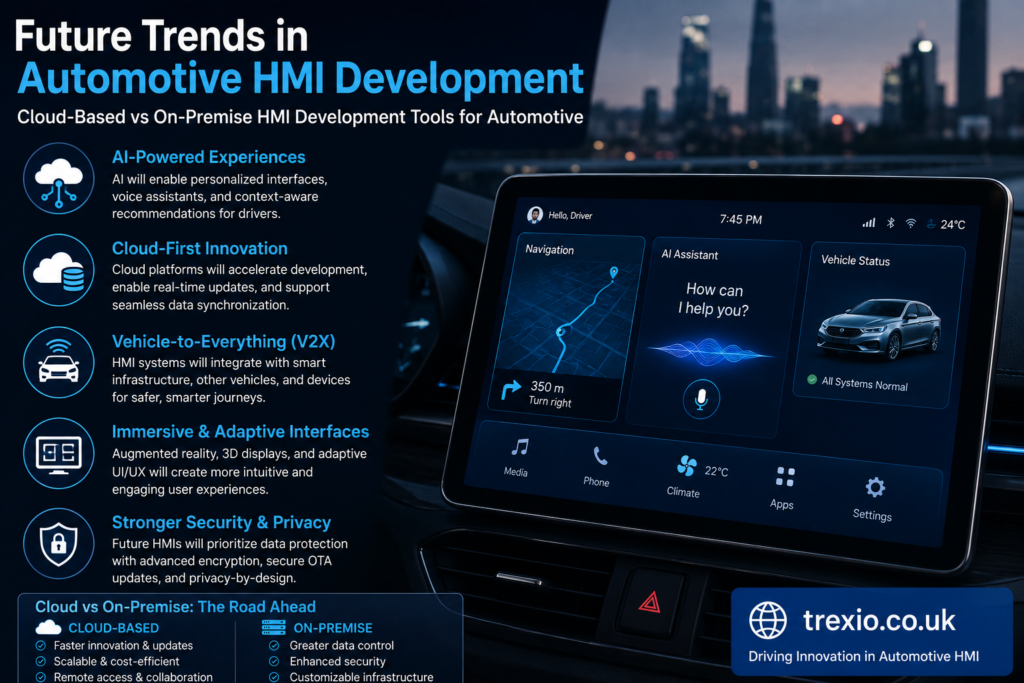
The future of cloud-based vs on-premise HMI development tools for automotive will be shaped by software-defined vehicles, artificial intelligence, edge computing, digital twins, over-the-air software updates, and increasing vehicle connectivity. Cloud technologies are expected to play an increasingly important role in collaborative engineering, automated testing, continuous integration, and large-scale simulation. Artificial intelligence will assist designers by generating interface layouts, optimizing user experiences, identifying usability issues, and automating repetitive development tasks. Digital twin technology will enable engineers to validate vehicle interfaces using virtual environments before physical prototypes become available. These innovations will significantly reduce development time while improving software quality.
At the same time, on-premise infrastructure will remain relevant for organizations requiring maximum control over intellectual property, regulatory compliance, and confidential engineering projects. Rather than replacing traditional environments entirely, cloud platforms are likely to complement existing infrastructure through hybrid deployment strategies. Automotive companies will increasingly adopt flexible ecosystems where sensitive workloads remain on-premise while collaborative development and large-scale simulations leverage cloud computing resources. Organizations evaluating cloud-based vs on-premise HMI development tools for automotive should therefore consider not only current requirements but also future technological trends and evolving customer expectations.
Best Practices for Selecting HMI Development Tools
- Define clear business objectives before evaluating deployment models.
- Calculate total cost of ownership instead of focusing only on purchase price.
- Assess cybersecurity requirements early in the selection process.
- Evaluate vendor reliability, technical support, and product roadmap.
- Ensure compatibility with existing automotive software ecosystems.
- Test scalability using realistic engineering workloads.
- Implement role-based access control and strong authentication.
- Regularly back up development environments and project repositories.
- Train engineering teams on secure software development practices.
- Periodically review infrastructure performance as projects evolve.
Common Mistakes to Avoid
- Choosing tools solely based on initial cost.
- Ignoring long-term maintenance expenses.
- Underestimating cybersecurity requirements.
- Failing to evaluate vendor support quality.
- Overlooking integration with existing development workflows.
- Selecting infrastructure that cannot scale with future projects.
- Neglecting employee training and adoption planning.
- Assuming cloud solutions automatically provide complete security.
- Delaying disaster recovery planning.
- Ignoring regulatory and compliance requirements.
Pro Tips for Automotive Development Teams
- Start with a pilot project before committing to enterprise-wide deployment.
- Consider hybrid architectures for maximum flexibility.
- Automate testing and continuous integration whenever possible.
- Use standardized development workflows across all engineering teams.
- Continuously monitor infrastructure performance and resource utilization.
- Invest in developer training to improve productivity.
- Establish strong cybersecurity governance from project initiation.
- Integrate user experience testing early in the HMI design process.
- Regularly review vendor updates and newly released features.
- Plan infrastructure with future software-defined vehicle requirements in mind.
Conclusion
Choosing between cloud-based vs on-premise HMI development tools for automotive is a strategic decision that influences software quality, engineering productivity, collaboration, cybersecurity, operational costs, and long-term innovation. Cloud-based platforms deliver exceptional scalability, simplified infrastructure management, remote collaboration, and faster software delivery, making them attractive for organizations embracing agile development and connected vehicle technologies. On-premise environments continue to provide unmatched control, extensive customization, predictable performance, and stronger infrastructure ownership for companies with specialized security or compliance requirements. As automotive software becomes increasingly sophisticated, many manufacturers are finding value in hybrid deployment models that combine the strengths of both approaches. The ideal solution depends on organizational priorities, available resources, regulatory obligations, engineering workflows, and future digital transformation plans. By carefully evaluating technical, financial, operational, and security considerations, automotive organizations can confidently select HMI development tools that support both current projects and future software innovation.
Frequently Asked Questions
1. What are HMI development tools in the automotive industry?
They are software platforms used to design, develop, test, simulate, and deploy vehicle user interfaces such as infotainment systems, digital dashboards, instrument clusters, and touchscreen controls.
2. Why are cloud-based HMI development tools becoming popular?
They enable remote collaboration, faster deployment, scalable computing resources, automatic updates, and easier integration with modern DevOps workflows.
3. Are on-premise HMI development tools more secure?
They provide greater infrastructure control, but overall security depends on governance, cybersecurity practices, and proper system management rather than deployment model alone.
4. Which deployment model is better for automotive startups?
Cloud-based platforms are generally better for startups because they reduce upfront costs, support rapid scaling, and simplify infrastructure management.
5. Can organizations combine cloud and on-premise environments?
Yes. Many automotive companies implement hybrid environments that keep sensitive workloads on-premise while using cloud resources for collaboration and testing.
6. How does cloud computing improve automotive software development?
Cloud computing accelerates development through scalable infrastructure, centralized collaboration, automated testing, continuous integration, and improved resource availability.
7. What factors should companies evaluate before selecting HMI development tools?
Important factors include security, compliance, scalability, cost, integration capabilities, vendor support, collaboration needs, and future business growth.
8. Do cloud platforms support automotive compliance standards?
Many enterprise cloud providers support compliance requirements, but organizations remain responsible for implementing secure configurations and governance policies.
9. Which industries besides automotive use HMI development tools?
Industrial automation, aerospace, healthcare, manufacturing, transportation, energy, and consumer electronics all rely on HMI development platforms.
10. Will cloud-based HMI development replace on-premise systems completely?
Most experts expect hybrid environments to become the preferred approach, allowing organizations to combine cloud flexibility with the control of on-premise infrastructure.
Author Bio
About the Author
The author is an experienced technology and automotive software writer specializing in embedded systems, Human Machine Interface (HMI) technologies, cloud computing, cybersecurity, and digital transformation. With extensive experience creating research-driven, SEO-optimized technical content, the author focuses on translating complex engineering concepts into practical guidance for developers, automotive professionals, and business decision-makers while following Google’s EEAT and Helpful Content principles.