
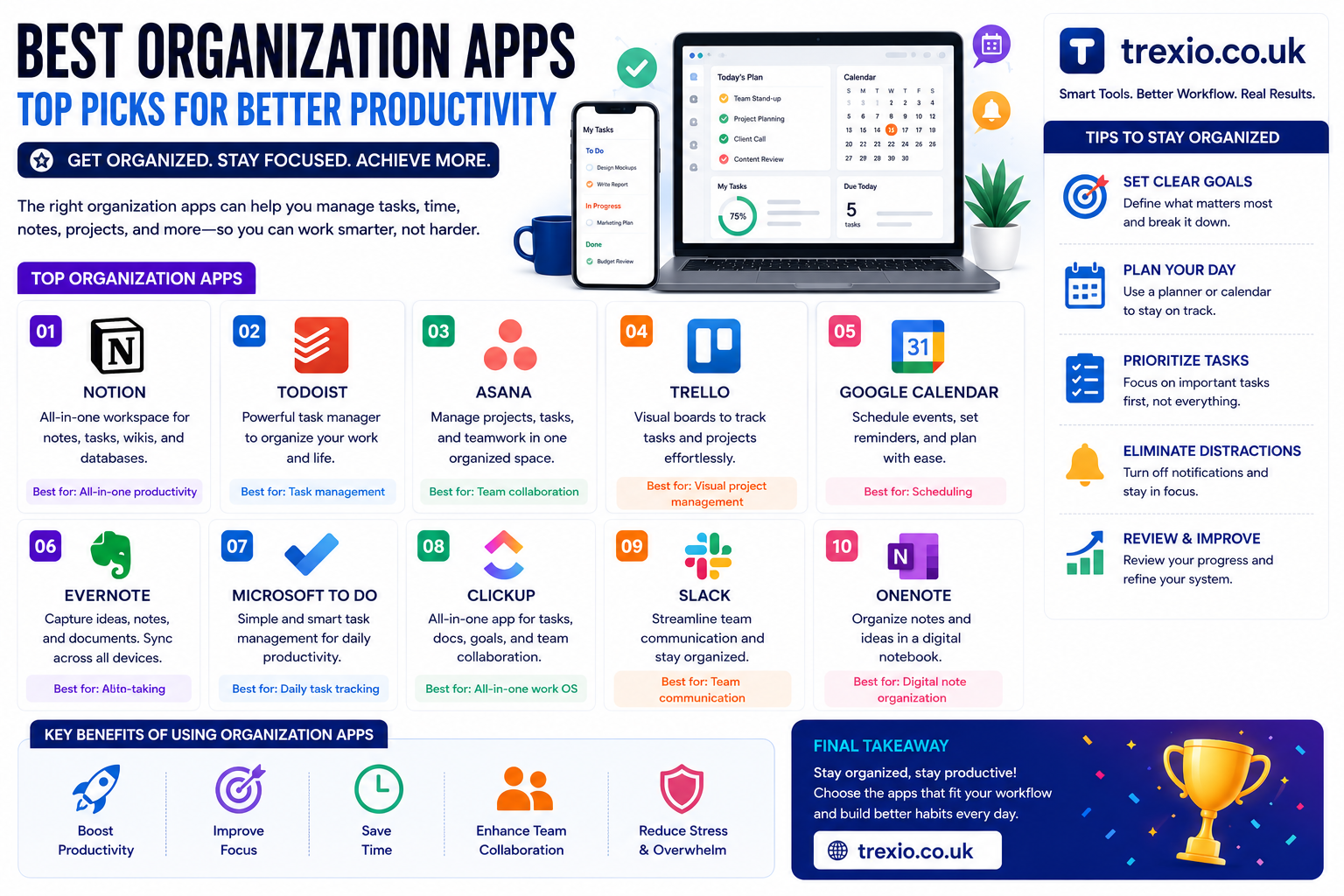
Staying organized has become more important than ever. Whether you’re a student, freelancer, business owner, or part of a growing team, using the best organization apps can simplify your daily workflow and improve productivity. Instead of juggling sticky notes, spreadsheets, and multiple reminders, the best organization apps help you keep everything in one place.
From task management to note-taking and team collaboration, the best organization apps are designed to save time and reduce stress. Many of these tools include calendars, reminders, file sharing, automation, and cross-device syncing, making them ideal for both personal and professional use.
In this guide, we’ll compare the best organization apps available today, highlighting their key features, strengths, pricing, and ideal use cases. By the end, you’ll know which of the best organization apps fits your workflow and helps you stay productive every day.
Quick Summary
If you’re searching for the best organization apps, here’s what you’ll learn:
- Compare the best organization apps for work and personal productivity.
- Learn which apps are ideal for students, professionals, and teams.
- Explore features like task management, note-taking, reminders, calendars, and collaboration.
- Find both free and premium options among the best organization apps.
- Understand which software offers the best value based on your needs.
Why Use the Best Organization Apps?
The best organization apps help users:
- Organize daily tasks
- Manage projects efficiently
- Track deadlines
- Store notes securely
- Improve collaboration
- Increase productivity
- Reduce missed appointments
- Keep personal and work life organized
Comparison Table of the Best Organization Apps
| Software | Best For | Key Features | Free Plan | Starting Price | Ease of Use | Overall Rating |
|---|---|---|---|---|---|---|
| Notion | All-in-one workspace | Notes, databases, tasks, docs, AI tools | Yes | $10/user/month | ⭐⭐⭐⭐⭐ | ⭐⭐⭐⭐⭐ |
| Todoist | Personal task management | Tasks, reminders, recurring schedules, priorities | Yes | $5/month | ⭐⭐⭐⭐⭐ | ⭐⭐⭐⭐☆ |
| Trello | Visual project organization | Kanban boards, automation, checklists | Yes | $6/user/month | ⭐⭐⭐⭐⭐ | ⭐⭐⭐⭐☆ |
| Microsoft OneNote | Digital note organization | Notes, handwriting, syncing, notebooks | Yes | Microsoft 365 plans | ⭐⭐⭐⭐☆ | ⭐⭐⭐⭐☆ |
| ClickUp | Team productivity | Tasks, docs, goals, dashboards, automation | Yes | $10/user/month | ⭐⭐⭐⭐☆ | ⭐⭐⭐⭐⭐ |
Detailed Comparison of the First 5 Best Organization Apps
1. Notion
| Category | Details |
|---|---|
| Best For | Individuals, students, businesses |
| Main Features | Notes, databases, task management, documents, AI assistant |
| Pros | Highly customizable, all-in-one workspace, excellent collaboration |
| Cons | Learning curve for beginners |
| Platforms | Windows, macOS, Android, iOS, Web |
| Free Version | Yes |
| Paid Plan | Starts at $10/user/month |
| Overall Score | ⭐⭐⭐⭐⭐ |
2. Todoist
| Category | Details |
|---|---|
| Best For | Personal productivity |
| Main Features | Task lists, reminders, recurring tasks, labels, priorities |
| Pros | Clean interface, fast, easy to use |
| Cons | Limited advanced features in free plan |
| Platforms | Windows, macOS, Linux, Android, iOS, Web |
| Free Version | Yes |
| Paid Plan | Starts at $5/month |
| Overall Score | ⭐⭐⭐⭐☆ |
3. Trello
| Category | Details |
|---|---|
| Best For | Project organization |
| Main Features | Kanban boards, automation, checklists, timelines |
| Pros | Very visual, beginner-friendly, flexible |
| Cons | Large projects can become cluttered |
| Platforms | Windows, macOS, Android, iOS, Web |
| Free Version | Yes |
| Paid Plan | Starts at $6/user/month |
| Overall Score | ⭐⭐⭐⭐☆ |
4. Microsoft OneNote
| Category | Details |
|---|---|
| Best For | Digital notebooks and note organization |
| Main Features | Notebook structure, handwriting support, multimedia notes |
| Pros | Excellent note organization, Microsoft ecosystem integration |
| Cons | Limited task management features |
| Platforms | Windows, macOS, Android, iOS, Web |
| Free Version | Yes |
| Paid Plan | Included with Microsoft 365 plans |
| Overall Score | ⭐⭐⭐⭐☆ |
5. ClickUp
| Category | Details |
|---|---|
| Best For | Teams and businesses |
| Main Features | Tasks, docs, goals, dashboards, automation, time tracking |
| Pros | Feature-rich, highly customizable, scalable |
| Cons | Interface may feel overwhelming initially |
| Platforms | Windows, macOS, Android, iOS, Web |
| Free Version | Yes |
| Paid Plan | Starts at $10/user/month |
| Overall Score | ⭐⭐⭐⭐⭐ |
6. Asana
Asana is a powerful organization app designed for teams and businesses that need to manage projects, assign tasks, and track deadlines. It offers multiple project views, automation, and reporting features.
| Category | Details |
|---|---|
| Best For | Teams and project management |
| Main Features | Task assignments, timelines, boards, automation, reporting |
| Pros | Excellent collaboration, scalable, user-friendly |
| Cons | Advanced features require paid plans |
| Platforms | Windows, macOS, Android, iOS, Web |
| Free Version | Yes |
| Paid Plan | Starts at approximately $10.99/user/month |
| Overall Score | ⭐⭐⭐⭐⭐ |
7. Evernote
Evernote remains one of the most popular note-taking and organization apps. It helps users organize notes, web clippings, documents, and images in one searchable workspace.
| Category | Details |
|---|---|
| Best For | Note organization |
| Main Features | Notes, notebooks, web clipper, document scanning, search |
| Pros | Powerful search, cross-device sync, easy organization |
| Cons | Free plan has limitations |
| Platforms | Windows, macOS, Android, iOS, Web |
| Free Version | Yes |
| Paid Plan | Starts at approximately $14.99/month |
| Overall Score | ⭐⭐⭐⭐☆ |
8. Google Keep
Google Keep is a lightweight app for creating notes, reminders, and checklists. It integrates well with Google Workspace, making it ideal for everyday organization.
| Category | Details |
|---|---|
| Best For | Simple note-taking |
| Main Features | Notes, reminders, voice memos, labels, collaboration |
| Pros | Free, easy to use, Google integration |
| Cons | Limited advanced organization tools |
| Platforms | Android, iOS, Web |
| Free Version | Yes |
| Paid Plan | Free |
| Overall Score | ⭐⭐⭐⭐☆ |
9. Monday.com
Monday.com provides customizable workflows that help teams organize projects, automate repetitive work, and improve collaboration.
| Category | Details |
|---|---|
| Best For | Business workflow management |
| Main Features | Dashboards, automation, project tracking, templates |
| Pros | Highly customizable, visual interface, scalable |
| Cons | Premium plans can become expensive |
| Platforms | Windows, macOS, Android, iOS, Web |
| Free Version | Yes |
| Paid Plan | Starts at approximately $9/user/month |
| Overall Score | ⭐⭐⭐⭐⭐ |
10. Any.do
Any.do combines task management, reminders, calendar planning, and daily scheduling into one intuitive application.
| Category | Details |
|---|---|
| Best For | Personal productivity |
| Main Features | Tasks, reminders, calendar, grocery lists, recurring tasks |
| Pros | Clean design, easy scheduling, cross-platform support |
| Cons | Some premium features are locked |
| Platforms | Windows, Android, iOS, Web |
| Free Version | Yes |
| Paid Plan | Starts at approximately $4.99/month |
| Overall Score | ⭐⭐⭐⭐☆ |
Feature Comparison Table
| Software | Task Management | Notes | Calendar | Collaboration | Automation | AI Features | Mobile App |
|---|---|---|---|---|---|---|---|
| Notion | ✅ | ✅ | ✅ | ✅ | Limited | ✅ | ✅ |
| Todoist | ✅ | Limited | ✅ | Limited | ✅ | No | ✅ |
| Trello | ✅ | Limited | ✅ | ✅ | ✅ | Limited | ✅ |
| OneNote | Limited | ✅ | No | ✅ | No | No | ✅ |
| ClickUp | ✅ | ✅ | ✅ | ✅ | ✅ | ✅ | ✅ |
| Asana | ✅ | Limited | ✅ | ✅ | ✅ | Limited | ✅ |
| Evernote | Limited | ✅ | Limited | ✅ | No | AI (Premium) | ✅ |
| Google Keep | Limited | ✅ | Limited | ✅ | No | No | ✅ |
| Monday.com | ✅ | Limited | ✅ | ✅ | ✅ | AI Available | ✅ |
| Any.do | ✅ | Limited | ✅ | Limited | ✅ | Limited | ✅ |
Pricing Comparison Table
| Software | Free Plan | Starting Paid Price | Best For |
|---|---|---|---|
| Notion | Yes | $10/user/month | All-in-one productivity |
| Todoist | Yes | $5/month | Personal task management |
| Trello | Yes | $6/user/month | Visual project tracking |
| Microsoft OneNote | Yes | Microsoft 365 Plans | Digital notebooks |
| ClickUp | Yes | $10/user/month | Teams and businesses |
| Asana | Yes | $10.99/user/month | Project management |
| Evernote | Yes | $14.99/month | Note-taking |
| Google Keep | Yes | Free | Everyday notes |
| Monday.com | Yes | $9/user/month | Business workflows |
| Any.do | Yes | $4.99/month | Daily organization |
How to Choose the Best Organization Apps
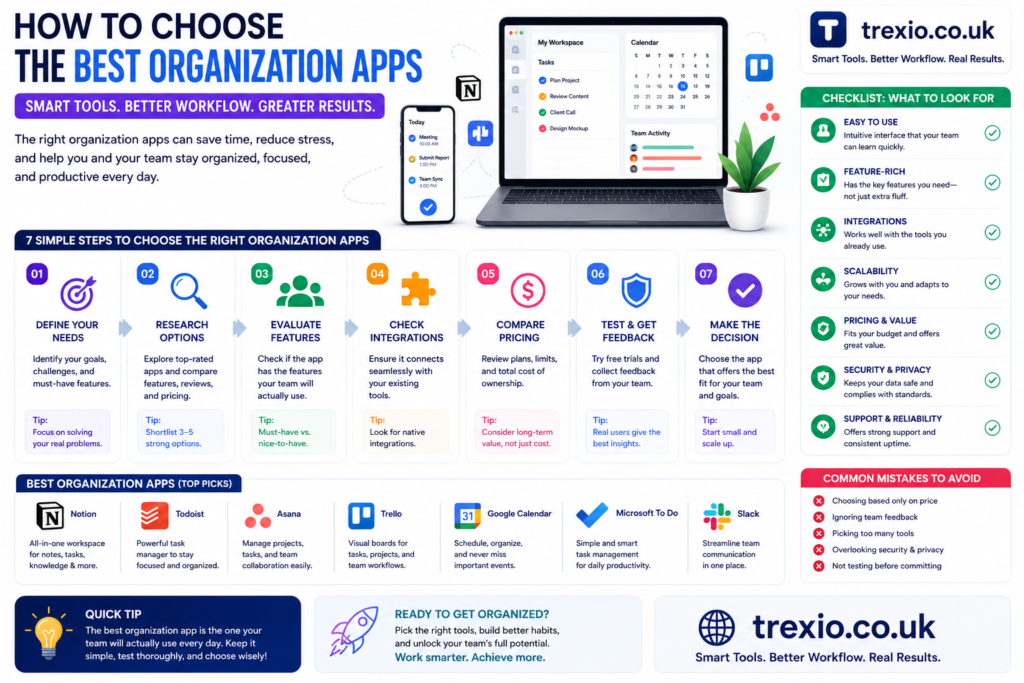
Choosing among the best organization apps depends on your workflow and productivity needs.
Consider Your Purpose
Determine whether you need an app for:
- Personal task management
- Team collaboration
- Project planning
- Note-taking
- Daily scheduling
Look for Essential Features
Choose apps that include:
- Task management
- Calendar integration
- Reminders
- File attachments
- Cloud synchronization
- Mobile accessibility
Check Collaboration Tools
If you work with others, prioritize apps offering:
- Shared workspaces
- Team permissions
- Comments
- Real-time editing
Evaluate Pricing
Many of the best organization apps offer generous free plans. Upgrade only if you need advanced automation, AI, or reporting features.
Test Before Buying
Use free trials to determine whether the interface, performance, and features fit your workflow.
Our Recommendation
Based on overall usability and features:
- Best Overall: Notion
- Best for Personal Productivity: Todoist
- Best for Teams: ClickUp
- Best for Project Management: Asana
- Best Visual Workspace: Trello
- Best Note-Taking: Microsoft OneNote
- Best Free Notes App: Google Keep
- Best Business Workflow: Monday.com
- Best Everyday Planner: Any.do
- Best Digital Notebook: Evernote
Conclusion
The best organization apps make it easier to manage tasks, projects, notes, and schedules from a single platform. Whether you’re organizing your personal life or leading a business team, the right app can improve productivity, reduce stress, and help you stay focused.
If you need an all-in-one solution, Notion is an excellent choice. For powerful team collaboration, ClickUp and Asana stand out. Users looking for simplicity can rely on Todoist, Google Keep, or Any.do. Evaluate your needs, explore the free plans, and choose the app that best supports your daily workflow.
Frequently Asked Questions (FAQs)
1. What are the best organization apps?
Some of the best organization apps include Notion, ClickUp, Todoist, Trello, Asana, Evernote, Google Keep, Monday.com, Microsoft OneNote, and Any.do.
2. Which organization app is completely free?
Google Keep is free, while many others offer free plans with optional premium upgrades.
3. Which app is best for students?
Notion and Microsoft OneNote are excellent choices for students due to their note-taking and organization features.
4. Which app is best for businesses?
ClickUp, Asana, and Monday.com are well-suited for business teams and project management.
5. Are organization apps available on mobile devices?
Yes. Most leading organization apps support Android and iOS along with desktop and web access.
6. Which app is best for task management?
Todoist and ClickUp are among the best for creating, organizing, and tracking tasks.
7. Can organization apps improve productivity?
Yes. They help centralize tasks, reminders, notes, and schedules, reducing missed deadlines and improving efficiency.
8. Which organization app is best overall?
Notion is widely regarded as one of the best all-around organization apps because it combines notes, tasks, databases, collaboration, and AI features.
Quick Bio
About the Author
This article was prepared by a technology writer specializing in productivity software, SaaS platforms, and digital workflow solutions. The goal is to provide accurate, easy-to-understand comparisons that help readers choose the best software for their personal and professional organization needs.