
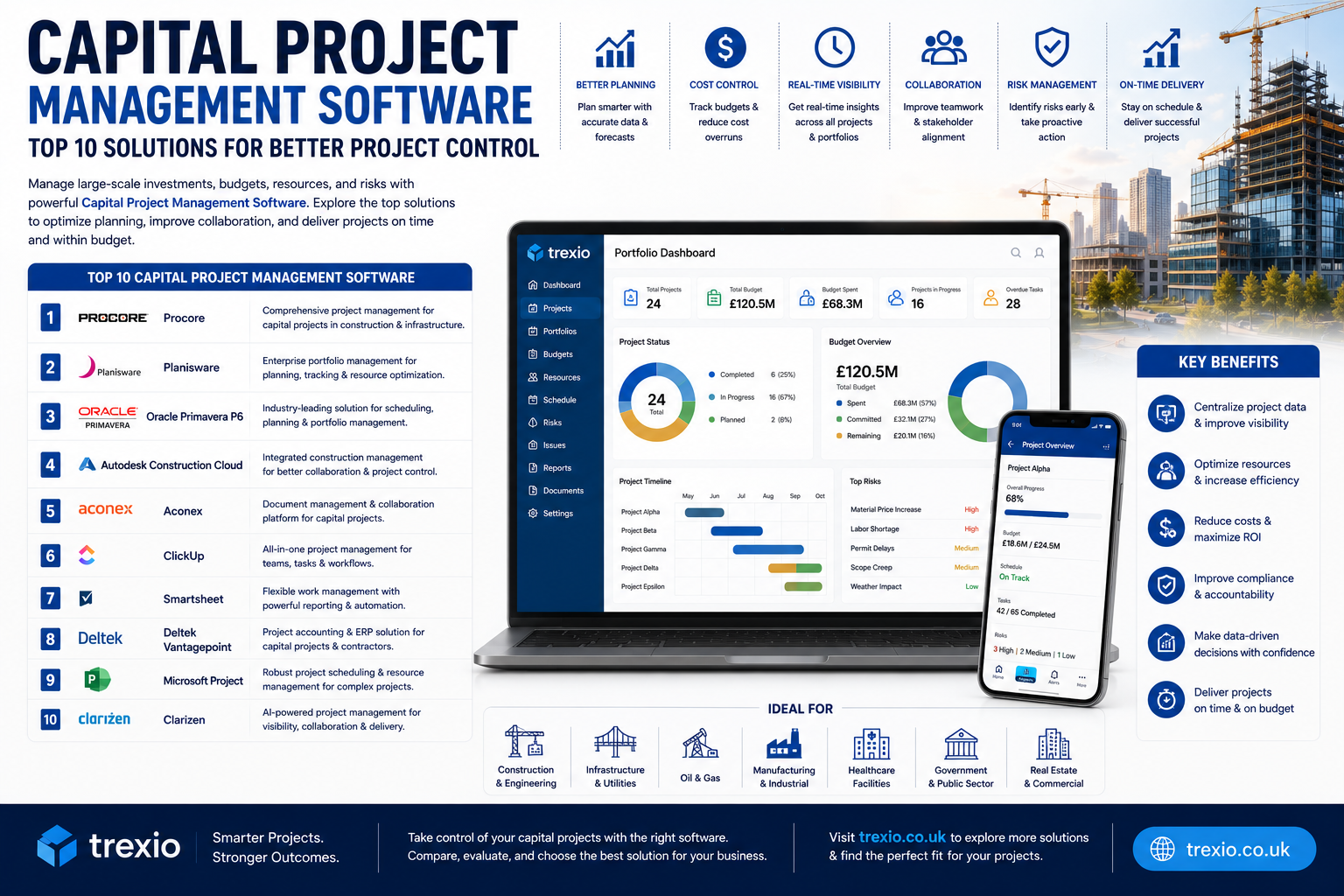
Managing large-scale Capital Project Management Software is far more complex than handling everyday business tasks. Construction projects, infrastructure development, manufacturing expansions, utility upgrades, and industrial investments involve millions of dollars, multiple stakeholders, strict compliance requirements, and constantly changing schedules.
Without the right technology, project delays, budget overruns, poor communication, and resource conflicts become common challenges.
That’s where Capital Project Management Software makes a significant difference. These platforms centralize planning, budgeting, scheduling, document management, reporting, risk tracking, and team collaboration into one integrated system. Project managers gain real-time insights, executives receive accurate financial reporting, and field teams stay connected throughout the project lifecycle.
In this guide, you’ll discover the best capital project management software available today, their standout features, ideal use cases, and what makes each platform unique.
Quick Summary
- Helps manage large capital investment projects efficiently
- Tracks budgets, costs, schedules, and project performance
- Improves collaboration between office and field teams
- Reduces project delays and cost overruns
- Supports document management and compliance
- Offers dashboards, reporting, and real-time analytics
- Suitable for construction, engineering, utilities, manufacturing, and government projects
What Is Capital Project Management Software?
Capital Project Management Software is designed to help organizations plan, execute, monitor, and complete large investment projects from start to finish. Unlike standard project management tools, these platforms focus on high-value projects involving complex budgets, long timelines, multiple contractors, regulatory compliance, procurement, and financial reporting.
The software provides a centralized workspace where teams can manage schedules, contracts, documentation, change orders, risk assessments, and project costs while maintaining complete visibility across every project phase.
Benefits of Using Capital Project Management Software
Better Budget Control
Track planned versus actual costs in real time to reduce unexpected expenses.
Improved Project Scheduling
Create detailed project timelines, manage dependencies, and identify delays before they impact delivery.
Enhanced Team Collaboration
Keep project managers, contractors, engineers, executives, and stakeholders connected through one platform.
Centralized Document Management
Store contracts, drawings, permits, reports, and project files securely in one location.
Real-Time Reporting
Interactive dashboards help leadership monitor project performance without waiting for manual reports.
Reduced Project Risks
Monitor issues, change orders, and compliance requirements to minimize costly mistakes.
Top Capital Project Management Software
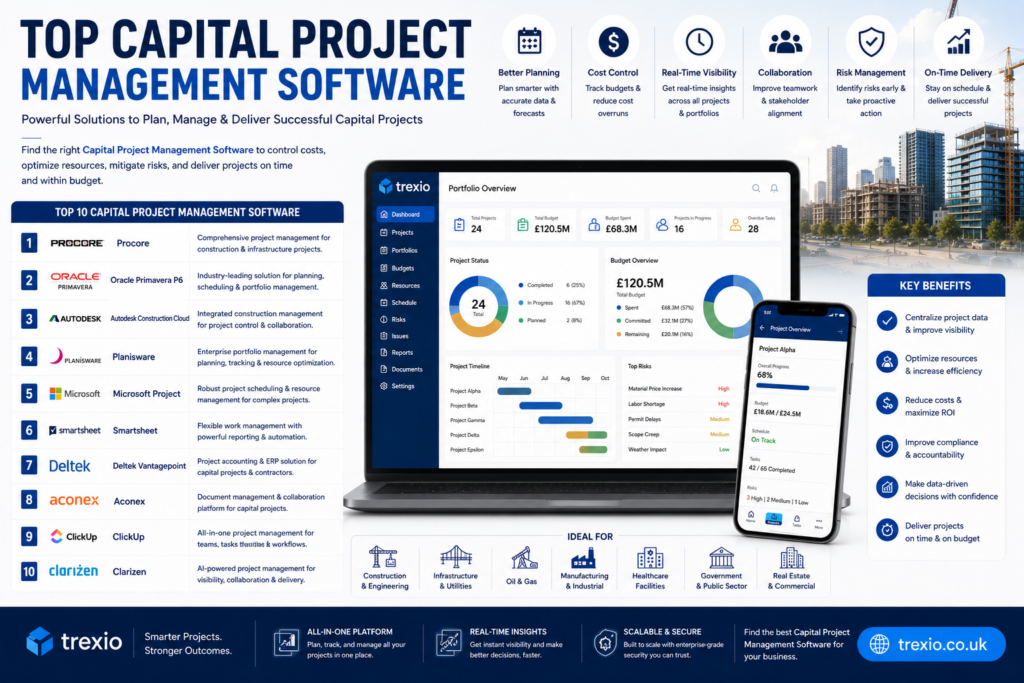
1. Oracle Primavera P6
Oracle Primavera P6 is one of the most recognized enterprise project management solutions for large Capital Project Management Software. It is widely used across construction, engineering, oil and gas, transportation, utilities, and government sectors.
The platform excels at managing highly complex schedules with thousands of activities while providing advanced resource planning and cost management capabilities.
Key Features
- Enterprise project scheduling
- Resource allocation
- Cost management
- Portfolio management
- Risk analysis
- Progress tracking
- Reporting dashboards
- Multi-project management
Pros
- Industry-leading scheduling engine
- Excellent for mega projects
- Powerful reporting capabilities
- Supports large project portfolios
Cons
- Steep learning curve
- Premium pricing
- Requires training for new users
Best For
Large enterprises managing complex capital investments.
2. Procore
Procore is a cloud-based construction management platform built for owners, contractors, and project managers. It simplifies communication while keeping budgets, RFIs, documents, schedules, and quality management organized in one place.
Its mobile-friendly design makes it especially valuable for field teams working across multiple job sites.
Key Features
- Budget tracking
- Document management
- RFIs
- Submittals
- Project scheduling
- Field collaboration
- Mobile application
- Financial reporting
Pros
- Easy-to-use interface
- Strong mobile experience
- Excellent collaboration tools
- Frequent product updates
Cons
- Pricing may be expensive for small firms
- Some advanced features require additional modules
Best For
Construction companies managing commercial and infrastructure projects.
3. Autodesk Construction Cloud
Autodesk Construction Cloud combines design collaboration, project management, document control, and field execution into a unified platform.
Organizations working with Building Information Modeling (BIM) benefit from seamless integration between design and construction workflows.
Key Features
- BIM integration
- Document control
- Quality management
- Cost tracking
- Issue management
- Project scheduling
- Collaboration tools
- Analytics dashboards
Pros
- Excellent BIM capabilities
- Strong document management
- Cloud-based collaboration
- Supports large construction projects
Cons
- Advanced functionality requires onboarding
- Higher cost for enterprise deployments
Best For
Engineering and construction companies using BIM workflows.
4. Microsoft Project
Microsoft Project has been a trusted project planning solution for decades. It offers flexible scheduling, task management, resource allocation, and reporting features suitable for organizations managing Capital Project Management Software of varying sizes.
Its integration with Microsoft 365 makes collaboration straightforward for businesses already using Microsoft’s ecosystem.
Key Features
- Gantt charts
- Resource management
- Budget tracking
- Task scheduling
- Portfolio management
- Custom reports
- Timeline planning
- Microsoft integration
Pros
- Familiar interface
- Strong scheduling tools
- Easy Microsoft integration
- Flexible reporting
Cons
- Limited collaboration without Microsoft ecosystem
- Can become complex for beginners
Best For
Organizations already using Microsoft business applications.
5. Oracle Aconex
Oracle Aconex is purpose-built for managing documents, workflows, and collaboration on large engineering and infrastructure projects. It provides a secure environment where owners, contractors, consultants, and suppliers can work together while maintaining complete document traceability.
The platform emphasizes transparency and accountability throughout the project lifecycle.
Key Features
- Document management
- Workflow automation
- Contract administration
- Communication tracking
- Inspection management
- Project controls
- Audit trails
- Secure collaboration
Pros
- Excellent document control
- Strong compliance support
- Secure collaboration
- Ideal for large multi-company projects
Cons
- Enterprise-focused pricing
- Initial setup can be time-consuming
Best For
Large infrastructure, engineering, and government-funded Capital Project Management Software.
6. Monday.com
Monday.com is a flexible work management platform that can be customized for Capital Project Management Software planning, budgeting, resource management, and collaboration. While it isn’t built exclusively for construction or engineering, its automation and dashboards make it suitable for organizations managing multiple capital initiatives.
Key Features
- Visual project dashboards
- Budget tracking
- Workflow automation
- Resource management
- Time tracking
- File sharing
- Custom reports
- Team collaboration
Pros
- Easy to customize
- User-friendly interface
- Strong automation capabilities
- Quick implementation
Cons
- Advanced features require higher-tier plans
- Less specialized for complex construction projects
Best For
Growing businesses seeking flexible project management software.
7. Smartsheet
Smartsheet combines the familiarity of spreadsheets with enterprise-grade project management features. It helps organizations manage capital projects using automated workflows, real-time reporting, and collaborative planning.
Key Features
- Gantt charts
- Budget management
- Automated workflows
- Resource tracking
- Project dashboards
- Approval workflows
- Document sharing
- Portfolio reporting
Pros
- Easy spreadsheet-style interface
- Strong automation
- Excellent reporting
- Good scalability
Cons
- Limited advanced construction tools
- Premium features increase overall cost
Best For
Organizations transitioning from spreadsheets to modern project management.
8. Asana
Asana is a popular project management platform that helps teams organize tasks, monitor project progress, and improve collaboration. It works well for planning smaller capital improvement projects and internal investment initiatives.
Key Features
- Task management
- Timeline planning
- Goal tracking
- Workflow automation
- Team collaboration
- Project templates
- Reporting dashboards
- File management
Pros
- Simple interface
- Fast onboarding
- Excellent collaboration
- Strong integrations
Cons
- Limited cost management
- Not designed for highly complex capital construction projects
Best For
Small and medium-sized organizations managing internal capital projects.
9. Wrike
Wrike is an enterprise work management solution offering customizable workflows, project tracking, budgeting, and reporting. Its advanced collaboration features make it suitable for Capital Project Management Software teams working across departments.
Key Features
- Project planning
- Resource allocation
- Workflow automation
- Budget monitoring
- Time tracking
- Custom dashboards
- Risk management
- Collaboration tools
Pros
- Highly customizable
- Strong reporting
- Good enterprise security
- Excellent team collaboration
Cons
- Learning curve for new users
- Advanced features require premium plans
Best For
Mid-sized and enterprise organizations with cross-functional project teams.
10. ProjectManager
ProjectManager is cloud-based project management software designed to help organizations plan, schedule, budget, and monitor projects with real-time reporting and collaboration features.
Key Features
- Gantt charts
- Kanban boards
- Budget tracking
- Resource management
- Time tracking
- Dashboards
- Reporting
- Team collaboration
Pros
- Easy implementation
- Real-time dashboards
- Affordable pricing
- Multiple project views
Cons
- Fewer enterprise-specific features
- Limited advanced engineering capabilities
Best For
Businesses looking for an affordable and easy-to-use Capital Project Management Software platform.
Feature Comparison Table
| Software | Budget Management | Scheduling | Resource Management | Reporting | Document Management | Best For |
|---|---|---|---|---|---|---|
| Oracle Primavera P6 | ✔ | ✔✔✔ | ✔✔✔ | ✔✔✔ | ✔ | Large enterprises |
| Procore | ✔✔ | ✔✔ | ✔✔ | ✔✔ | ✔✔✔ | Construction firms |
| Autodesk Construction Cloud | ✔✔ | ✔✔ | ✔✔ | ✔✔ | ✔✔✔ | BIM-based projects |
| Microsoft Project | ✔✔ | ✔✔✔ | ✔✔ | ✔✔ | ✔ | Microsoft users |
| Oracle Aconex | ✔✔ | ✔ | ✔ | ✔✔ | ✔✔✔ | Infrastructure projects |
| Monday.com | ✔ | ✔✔ | ✔✔ | ✔✔ | ✔ | Growing businesses |
| Smartsheet | ✔✔ | ✔✔ | ✔✔ | ✔✔✔ | ✔✔ | Spreadsheet users |
| Asana | ✔ | ✔✔ | ✔ | ✔ | ✔ | Internal projects |
| Wrike | ✔✔ | ✔✔ | ✔✔ | ✔✔✔ | ✔✔ | Enterprise teams |
| ProjectManager | ✔✔ | ✔✔ | ✔✔ | ✔✔ | ✔ | SMBs |
Pricing Comparison Table
| Software | Free Plan | Starting Price* | Custom Enterprise Pricing |
|---|---|---|---|
| Oracle Primavera P6 | No | Custom Quote | Yes |
| Procore | No | Custom Quote | Yes |
| Autodesk Construction Cloud | No | Custom Quote | Yes |
| Microsoft Project | No | From approximately $10/user/month | Yes |
| Oracle Aconex | No | Custom Quote | Yes |
| Monday.com | Yes | From approximately $9/user/month | Yes |
| Smartsheet | No | From approximately $12/user/month | Yes |
| Asana | Yes | From approximately $11/user/month | Yes |
| Wrike | Yes | From approximately $10/user/month | Yes |
| ProjectManager | No | From approximately $14/user/month | Yes |
*Pricing may change over time. Always check the vendor’s website for the latest plans.
How to Choose the Right Capital Project Management Software
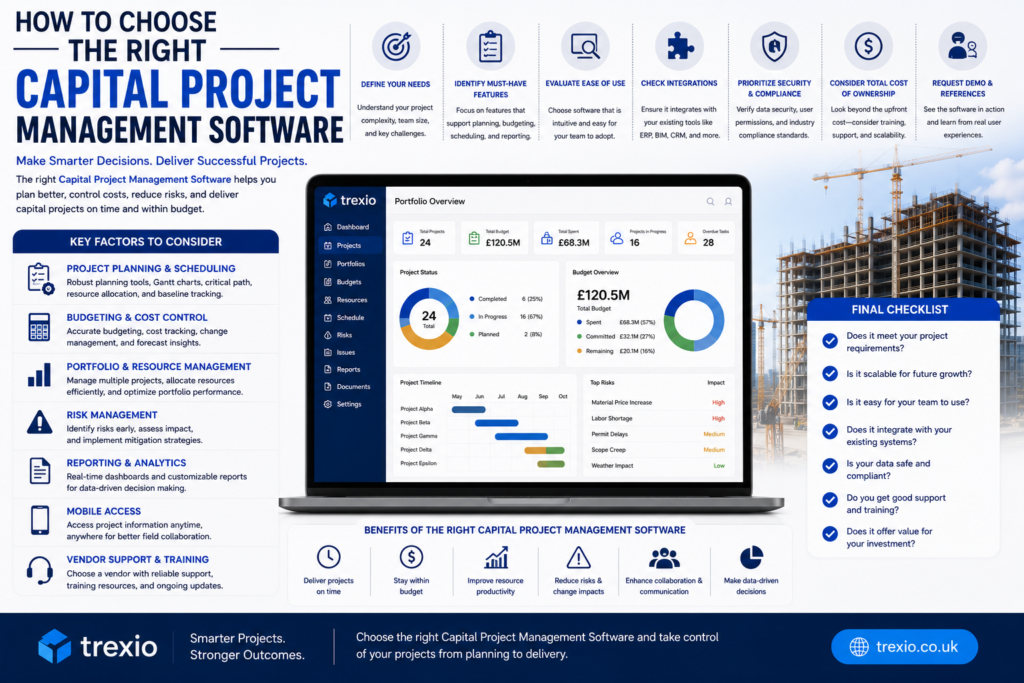
Selecting the right solution depends on your organization’s project size, budget, and operational requirements. Keep these factors in mind:
Project Complexity
Large infrastructure and engineering projects typically require enterprise-grade scheduling, budgeting, and compliance tools.
Budget Management
Choose software with real-time cost tracking, forecasting, and financial reporting if controlling project expenses is a top priority.
Collaboration Features
Ensure the platform allows project managers, contractors, consultants, and executives to communicate efficiently.
Ease of Use
An intuitive interface reduces training time and encourages faster adoption across teams.
Integrations
Verify compatibility with your accounting software, ERP, CRM, document management systems, and productivity tools.
Scalability
Select software that can support additional projects, users, and locations as your organization grows.
Our Recommendation
Every organization has different project management needs, but these solutions stand out for specific use cases:
- Best Overall: Oracle Primavera P6
- Best for Construction: Procore
- Best for BIM Projects: Autodesk Construction Cloud
- Best Microsoft Ecosystem: Microsoft Project
- Best Enterprise Collaboration: Oracle Aconex
- Best Value: Monday.com
- Best Spreadsheet Alternative: Smartsheet
- Best for Team Collaboration: Asana
- Best Enterprise Work Management: Wrike
- Best Affordable Solution: ProjectManager
Conclusion
Capital project management software plays a vital role in delivering complex projects successfully. From planning and budgeting to scheduling, reporting, and collaboration, the right platform improves efficiency while reducing delays and unexpected costs.
Organizations managing large construction, engineering, manufacturing, or infrastructure projects should prioritize software that offers robust scheduling, financial tracking, document management, and scalable collaboration tools. By carefully evaluating your business needs and comparing available solutions, you can select software that supports long-term project success and maximizes your capital investments.
Frequently Asked Questions
1. What is capital project management software?
It is software designed to plan, manage, monitor, and control large capital investment projects, including budgets, schedules, resources, documentation, and reporting.
2. Who uses capital project management software?
Construction companies, engineering firms, manufacturers, utilities, government agencies, real estate developers, and infrastructure organizations commonly use it.
3. What features should I look for?
Look for scheduling tools, budget tracking, document management, reporting, resource planning, collaboration features, and workflow automation.
4. Is cloud-based software better than on-premise software?
Cloud-based solutions provide easier collaboration, automatic updates, remote access, and lower maintenance costs, making them a popular choice for many organizations.
5. Can small businesses use capital project management software?
Yes. Platforms such as Monday.com, Asana, Smartsheet, and ProjectManager are suitable for small and medium-sized businesses.
6. Does this software integrate with accounting systems?
Most leading solutions integrate with ERP and accounting platforms to improve financial management and reporting.
7. How much does capital project management software cost?
Pricing ranges from affordable monthly subscriptions for small teams to custom enterprise pricing for large organizations, depending on features and deployment needs.
8. Which capital project management software is the best?
Oracle Primavera P6 is widely recognized for large enterprise capital projects, while Procore and Autodesk Construction Cloud are excellent choices for construction-focused organizations.
Quick Bio
About the Author
This article was written by an experienced SaaS and B2B technology content writer specializing in project management software, construction technology, and enterprise business solutions. The goal is to provide accurate, practical, and SEO-focused content that helps organizations compare software, improve operations, and make informed purchasing decisions.